How to Sell on WhatsApp Like a Pro: Your Ultimate Guide to Skyrocketing Sales
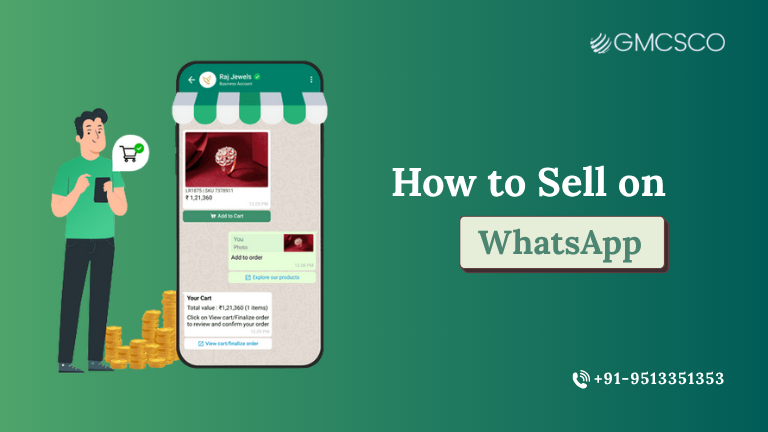
Why You Should Use WhatsApp for Sales Imagine this: You run a small bakery in Mumbai, a customer sends you a message on WhatsApp asking about your chocolate cupcakes. A moment later, you shoot them a tantalizing photograph, a brief list of prices and a link to order. Boom – deal closed! That’s the beauty of WhatsApp sales. While emails get buried and ads are ignored, WhatsApp messages boast an eye-popping 90%+ open rate. So meeting them in WhatsApp is not a pushy move, but a natural one, as people are already using the service every day. Whether you’re a one-person seller or a massive business in India, Saudi Arabia or beyond, selling on WhatsApp means you get to reach your customers directly, respond to their questions in real-time, and cultivate relationships that mean one-off buyers become true fans. What’s more, with solutions such as WhatsApp Business API Services in India and WhatsApp Business API Services in Saudi Arabia, you get to scale your efforts while automating like a pro. Now that you’re ready to get started, ready to learn how to sell on WhatsApp Business in India or anywhere else in the world? Let’s take it step by step. Step 1: Create a Stellar WhatsApp Business Profile The first step to using WhatsApp for marketing properly is to design a profile that works like a charm. So, first, you need to have some kind of business presence. Download the WhatsApp Business app (it’s available for free!) and build a profile that shouts “I’m legit.” Include your business name, logo, contact information, and clever copy. For instance, if you’re peddling handmade jewelry, your bio might read, “Handcrafted treasures made with love DM to customize your sparkle!” Pro tip: Get verified to get that green tick – it’s almost like a trust badge that reassures customers. If you’re expanding, partner with a WhatsApp Marketing services agency like GMCSCO Media Group to install WhatsApp Business API Services in India or Saudi Arabia for powerful features including automation and multi-agent support. Step 2: Create Your WhatsApp Shop Ready to up your sales game? Sell on WhatsApp through WhatsApp Shop! With the WhatsApp Business app, you can add a catalogue directly in the app. Consider it your mini e-commerce shop, a place to display products with photos, information, prices and links to purchase. Here’s how to set it up: Open the WhatsApp Business app and tap Settings > Catalog. Include items for which you have clear, high-resolution images (no blurry snaps, please!). Include elements such as price, description and a link to the website or payment gateway. Share your catalogue directly with customers or in group chats. For instance, a coffee shop in Jeddah might share a menu of their brews, along with prices and a “Order Now” link. Customers love the convenience, and you will love the influx of orders. If you’re in a larger market, WhatsApp Business API Services in Saudi Arabia will allow you to connect your catalog to your website for easy sales. Step 3 - Learn the Art of Reaching Out Personally This is where the human touch comes in. Selling on WhatsApp isn’t about just spamming people with sales pitches — it’s about building relationships. Respond to messages quickly; address guests by name and maintain a friendly but professional tone. For example, rather than “Buy our shoes now,” experiment with, “Hey Priya! I saw you liked our sneakers—do you want me to send you the latest collection? ” Get some personality in there by using WhatsApp’s features, like voice notes or quick replies. A voice note that goes, “Thanks for your order, Ahmed! Your coffee beans are in the mail!” feels infinitely more personal than a generic email. This is what is behind how to sell on WhatsApp Business in India, a country where trust is so important to customers. Step 4: Use Groups and Broadcasts to Reach Even More People Looking to target many customers at the same time? WhatsApp groups and broadcast lists are your new best friends whore. Make them for specific customer segments — like “VIP Customers” or “New Arrivals Fans” — and share exclusive deals or updates. For instance, a boutique in Delhi could form a group for “Saree Lovers,” sharing new designs weekly. Broadcast lists allow you to send messages to contacts without using a group. It’s excellent for announcing flash sales or new products. (Zoe and Yumi’s exchange involved a little more than that, of course, but Yumi made sure to ask if what they were doing was okay —you never want to send a text that you shouldn’t and then can’t take back.) Using WhatsApp Marketing service, you can have a partner who can handle the broadcasting at scale, especially, in case you are looking for WhatsApp Business API for India & Saudi Arabia. Also Read About WhatsApp Marketing for Healthcare Step 5: WhatsApp Business API for Automation like a Pro If you’re swamped with messages, automation is your secret sauce. The WhatsApp Business API Services in India and Saudi Arabia also allow you to establish chatbots to deal with FAQs, confirm orders or even process payments. For instance, a pharmacy in Riyadh might deploy a chatbot that is tasked with answering “What is the price of paracetamol?” or “When will I receive that order?” with staff paying attention to customers inside the store. Here’s a quick setup guide: Associate with a WhatsApp Marketing services provider, GMCSCO Media Group. Make pre-approved message templates (such as “Your order ID [OrderID] has been shipped!”). Automatically sync with your CRM or e-commerce system when you receive messages for custom replies. Leverage AI to understand questions and contextually respond. “It saves time, it also makes customers happy,” particularly in fast-moving markets such as India and Saudi Arabia, she added. Step 6: Share Your WhatsApp Number Everywhere Your WhatsApp number is your shop, so broadcast the news! Place a “Message Us on WhatsApp” button on your website, social media and in your store. For instance, a food truck owner in Bangalore might print their WhatsApp number on flyers with a call-to-action: “Want tacos? DM us to order!” Whatsapp QR codes or short URLs (e.g., wa.me/yournumber) to make chat easy for customers to begin. More people see your number, more chances of selling on WhatsApp. Also Read About AI SEO Step 7: Follow and Adjust
How to Sell on WhatsApp Like a Pro: Your Ultimate Guide to Skyrocketing Sales Read More »