
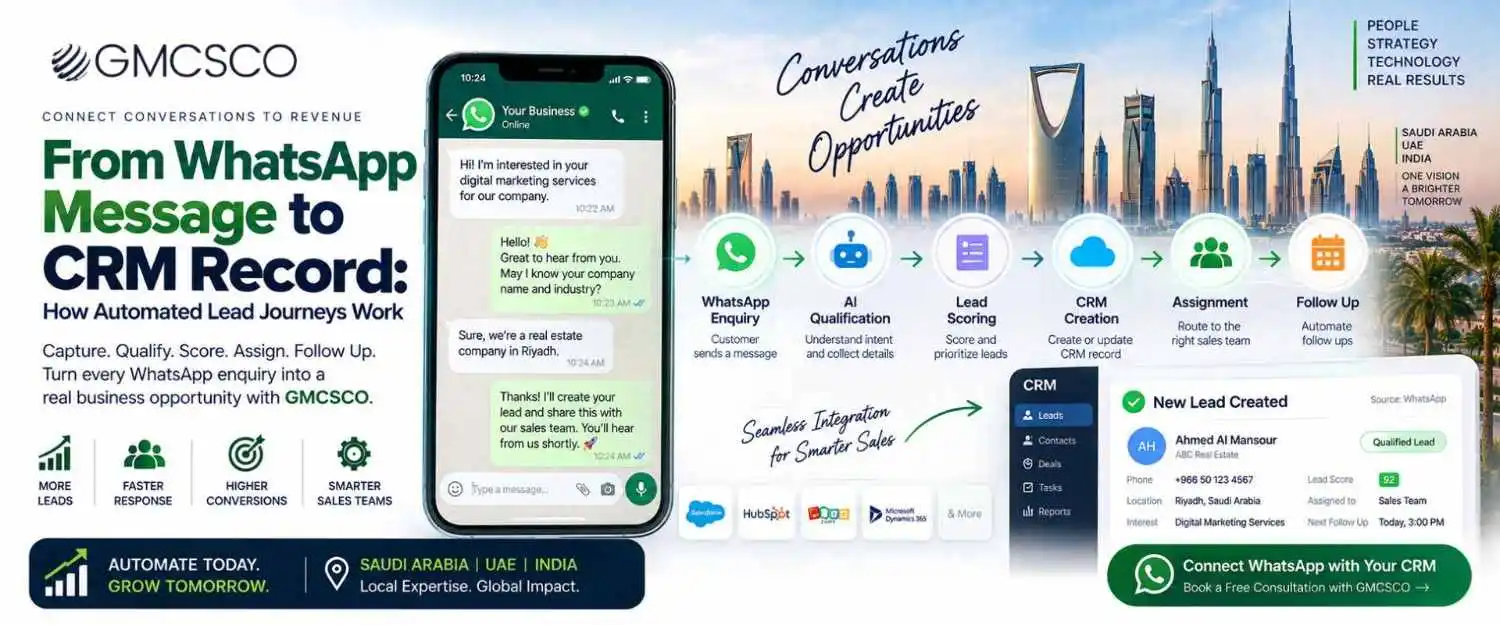
From a WhatsApp Enquiry to a Sales-Ready CRM Lead: The Complete Automation Guide
What happens after “Hi, I want to know more about your service” determines whether it becomes revenue or disappears into a busy inbox.
Quick Answer
WhatsApp CRM lead automation is a system that automatically captures customer enquiries from WhatsApp, collects relevant information, qualifies the lead, creates or updates a CRM record, and triggers the next sales or marketing action. Instead of Customer → WhatsApp → Employee → Manual CRM entry, the automated model becomes Customer → WhatsApp → Automation → CRM → Sales, with an AI layer making it even more intelligent: Customer → WhatsApp → AI qualification → Lead score → CRM → Assignment → Follow up. The objective isn’t to remove humans from the sales process — it’s to eliminate repetitive administrative work so sales teams can spend more time on qualified opportunities. Saudi Arabia’s 2025 Internet Report recorded 99.6% internet penetration, 92.7% WhatsApp usage, and 61.3% of users spending seven or more hours online daily.
Why WhatsApp and CRM Integration Matters in 2026
A potential customer may discover a business through Google Search, visit the website, click WhatsApp, then ask a question. If that conversation stays only inside WhatsApp, the business has limited visibility into what happens next. CRM integration creates the missing connection — the business can know who contacted them, what they requested, where they came from, whether they’re qualified, which salesperson owns the lead, what stage the opportunity is in, and whether the lead eventually became a customer. That’s where WhatsApp becomes part of a measurable revenue process.
The Complete Automated Lead Journey
1. Discover
2. WhatsApp Chat
3. Enquiry Received
4. AI Understands Intent
5. Qualifying Questions
6. Info Collected
7. Lead Scored
8. CRM Record
9. Lead Assigned
10. Sales Notified
11. Auto Follow-Up
12. Sales Conversation
13. Becomes Customer
14. Outcome Recorded
Step 1: Customer Sends a WhatsApp Enquiry
The source could be a website WhatsApp button, Google Ads, Meta Ads, a QR code, Google Business Profile, or referral. A customer searching for an IT company in Riyadh clicks “Chat with us on WhatsApp” and writes “I need WhatsApp Business API for my company” — this initial message already contains useful intent information, so instead of sending them to a generic form, the system begins qualification directly inside WhatsApp.
Step 2: Identify the Customer
The system captures WhatsApp number, name, message, timestamp, campaign source, and existing customer status. If the person already exists in the CRM, the system identifies the existing record; if new, it begins creating a lead profile — avoiding one of the most common sales problems: the same customer treated as a brand-new enquiry every time they contact the company.
Step 3: Understand the Customer’s Intent
A traditional chatbot uses buttons (1. Website Development 2. SEO 3. WhatsApp Marketing). An AI-powered system understands natural language — “We are a real estate company in Riyadh and need a WhatsApp bot that can answer property questions and send leads to our CRM” gets extracted into Industry: Real estate, Location: Riyadh, Requirement: WhatsApp AI chatbot, Integration: CRM — far more useful than simply storing “WhatsApp enquiry.”
Step 4: Ask Qualification Questions
Questions shouldn’t feel like a long form — they should follow the conversation naturally: “Are you currently using a CRM?” → “Yes, Salesforce.” → “Approximately how many leads do you receive through WhatsApp each month?” → “Around 500.” → “Would you like the system to automatically qualify and assign those leads?” → “Yes.” The system now has meaningful sales information without a traditional form.
What Should a WhatsApp Lead Capture?
| Field | Example |
|---|---|
| Name | Ahmed |
| Company | ABC Properties |
| Industry | Real Estate |
| Location | Riyadh |
| Requirement | WhatsApp AI Agent |
| CRM | Salesforce |
| Lead volume | 500/month |
| Timeline | 30 days |
| Intent | High |
An ecommerce business would instead capture product interest, order number, and delivery location. The automation should collect only information that’s useful for the next business decision.
Step 5: Qualify the Lead
Information Request
The customer is researching.
Marketing Qualified
Matches the target profile and shows interest.
Sales Qualified
Defined need, ready for sales engagement.
High Intent
Ready to discuss pricing or purchase.
Step 6: Lead Scoring
| Lead Attribute | Score |
|---|---|
| Target industry | +20 |
| Saudi Arabia | +10 |
| Clear requirement | +20 |
| Budget provided | +20 |
| Timeline under 30 days | +15 |
| Decision maker | +15 |
Classification: 80–100 High priority, 50–79 Medium priority, below 50 Nurture. The exact model should be customized for the business — scoring should reflect actual sales probability, not arbitrary numbers.
Step 7: Create the CRM Record Automatically
Instead of a salesperson manually entering name, phone, company, and notes, the automation sends information directly through an integration: WhatsApp → Automation → CRM API → Lead Record. A useful CRM record includes:
Contact Info
Name, phone, email.
Company Info
Name, industry, size, location.
Lead Info
Requirement, estimated value.
Marketing Info
Campaign, source, keyword.
Conversation Info
Key WhatsApp details.
Qualification
Lead score, stage, intent.
Sales Ownership
Assigned salesperson or team.
Next Action
Call, meeting, quotation.
Step 8: Assign the Lead to the Right Salesperson
Assignment can be based on location, industry, product, language, or lead score — a Riyadh real estate lead routes to the Saudi real estate team, a Dubai ecommerce lead routes to the UAE ecommerce team, an enterprise AI project routes to the enterprise solutions team. This prevents leads from simply sitting in a shared WhatsApp inbox.
Step 9: Notify the Sales Team
🔔 New High Priority Lead
Company: ABC Properties · Location: Riyadh · Requirement: WhatsApp AI Agent · CRM: Salesforce · Lead Score: 92 · Timeline: 30 days · Source: Google Ads
The salesperson can immediately continue the conversation — creating a much shorter path between customer intent and sales response. The longer a qualified lead waits, the greater the risk they move to another provider.
Step 10: Automated Follow-Up
Many leads say “send me the details, I’ll check and get back to you” — without automation, follow-up may never happen. A workflow can manage: Day 0 send requested information, Day 2 check if they have questions, Day 5 share a relevant case study, Day 10 offer a consultation. Exact timing should depend on the business, customer expectations, and applicable WhatsApp policies.
WhatsApp Messaging Rules Matter
Automation shouldn’t be treated as permission to send unlimited promotional messages. WhatsApp Business policies require appropriate user opt-in before contacting people and require respecting requests to stop receiving communications, alongside rules around business-initiated conversations, approved templates, and the 24-hour customer service window. The architecture should include consent tracking, opt-out handling, message category management, and human escalation — automation should make compliance easier to manage, not harder.
🇸🇦 Saudi Arabia PDPL
Requirements around direct marketing consent, clear sender identity, and mechanisms allowing recipients to stop receiving marketing — architecture should trace Data collection → Purpose → Consent → Storage → Access → Retention → Deletion/opt-out.
🇦🇪 UAE PDPL
A framework for confidentiality, privacy, and data governance — CRM integration should include access controls, secure authentication, data minimization, and customer rights management.
This article isn’t legal advice — organizations should obtain appropriate privacy or legal guidance for their specific implementation.
WhatsApp CRM Lead Automation Architecture
Customer → WhatsApp → WhatsApp Business Platform
↓
Webhook/Integration Layer → AI or Automation Engine
↓
Lead Qualification → Lead Scoring
↓
CRM API → CRM Record → Assignment
↓
Sales Notification → Follow-Up Automation → Reporting
What Happens Behind the Scenes?
A customer sends “Hi, I need a WhatsApp chatbot for my clinic in Dubai” — the system processes: (1) Message received, (2) AI detects Requirement: chatbot, Industry: Healthcare, Location: Dubai, (3) System asks about monthly enquiry volume, (4) Scoring engine evaluates the answer, (5) CRM lead created, (6) Assigned to the UAE sales team, (7) Salesperson alerted, (8) CRM schedules the next action. One WhatsApp message becomes a structured sales opportunity without a salesperson manually performing every administrative step.
The Three-Layer Model
WhatsApp = Conversation
Provides the customer communication interface.
AI = Intelligence
Understands conversations and supports qualification.
CRM = Customer Record
Stores customer and sales information.
💬 Turn WhatsApp Conversations Into CRM Revenue
GMCSCO can help design and implement WhatsApp CRM lead automation including AI qualification, lead scoring, and API integration.
Manual vs Automated WhatsApp Lead Management
| Process | Manual | Automated |
|---|---|---|
| Lead capture / enquiry response | Human responds | Automatic response |
| Qualification | Manual / sales team | Automated or AI assisted |
| Data entry | Manual | Automatic |
| Lead scoring | Manual | Automated |
| CRM creation / assignment | Manual | Automatic / rule based |
| Duplicate detection | Difficult | Configurable |
| Sales notification / follow-up | Manual / memory based | Automatic / workflow based |
| Reporting & lead visibility | Limited / fragmented | Centralized |
| Response speed | Depends on staff | Immediate initial response |
| Scalability | Low to medium | High |
Automation doesn’t eliminate the sales team — it gives the sales team a better starting point.
Which CRM Systems Can Be Connected?
HubSpot
Zoho CRM
Microsoft Dynamics
Freshsales
Pipedrive
Custom CRM
WhatsApp CRM Automation by Industry
Real Estate
“I want a 3 bedroom apartment in Riyadh under SAR 1.5 million” gets extracted into location, property type, bedrooms, and budget — the system creates the lead, scores the opportunity, assigns a property consultant, searches approved listings, and can schedule a viewing.
Ecommerce
“Do you have this product in black, size 42?” — identify product → check inventory → provide options → share product link → support purchase → update CRM. The value increases when connected to the ecommerce platform instead of manually maintained product data. See our ecommerce development services.
Healthcare
Suitable for appointment enquiries, clinic timings, and booking requests — carefully designed around privacy and clinical boundaries, with human escalation for sensitive medical matters rather than an AI making unsupported clinical decisions.
Travel
“We are a family of four visiting Jordan in December from Dubai” captures travel dates, travelers, budget, and preferences — the CRM stores the enquiry and assigns it to a travel consultant.
Logistics
“I need to ship 2 pallets from Dubai to Riyadh next week” triggers a qualification workflow collecting origin, destination, cargo type, weight, and date — the CRM receives a structured logistics lead.
B2B Services
B2B sales cycles often move through Initial enquiry → Qualification → Discovery call → Requirement gathering → Proposal → Negotiation → Contract → Customer. WhatsApp captures the initial enquiry while the CRM manages the longer sales process.
Lead Scoring Example for a B2B Digital Services Company
| Qualification Factor | Points |
|---|---|
| Target industry | +15 |
| Saudi/UAE market | +10 |
| Decision maker | +20 |
| Clear project requirement | +20 |
| Budget available | +15 |
| Timeline under 60 days | +10 |
| Existing CRM | +5 |
| Requested meeting | +10 |
Regularly compare lead scores with actual conversion data and adjust the model — the score is only useful if it reflects real sales outcomes.
Lead Routing & Stage-Based Follow-Up
UAE Leads → UAE sales team
Enterprise → Enterprise sales
Arabic → Arabic-speaking rep
Not every lead should get the same follow-up: New Lead → acknowledgement, Qualified Lead → offer consultation, Proposal Sent → follow up on proposal, Negotiation → alert sales manager, No Response → approved nurture workflow, Customer → trigger onboarding.
How AI Can Improve Lead Qualification
“We are currently using another provider, but their response time is poor. We want to switch before the end of this month” contains strong buying signals — existing solution, pain point, switching intent, timeline. AI can flag this as high intent and notify sales immediately. AI should support qualification while business rules and sales teams retain appropriate control.
Measuring WhatsApp CRM Lead Automation ROI
Volume & Speed
Lead volume, qualification rate, response time.
Sales Progress
Appointment rate, opportunity rate, conversion rate.
Economics
Revenue, cost per qualified lead, customer acquisition cost.
Illustrative Dashboard
| KPI | Example |
|---|---|
| WhatsApp enquiries | 2,500 |
| Qualified leads | 850 (34%) |
| Sales opportunities / Meetings booked | 320 / 210 |
| Customers / Revenue | 75 / SAR 900,000 |
| Avg. response time / Automated conversations | 2 min / 68% |
Numbers are illustrative, not benchmark claims — exact KPIs should be configured around the business model.
📅 Ready to Connect WhatsApp With Your CRM?
Schedule a free consultation to discuss your WhatsApp and CRM workflow with GMCSCO.
How to Build a WhatsApp CRM Lead Automation System
Map the Current Journey
Where leads come from, who responds, where data is stored.
Define Qualification Rules
ICP, required information, lead score, assignment rules.
Configure WhatsApp
Set up the WhatsApp Business infrastructure and messaging workflows.
Build the AI/Automation Layer
Rule-based automation, AI interpretation, or AI agent action — not every step needs AI.
Integrate the CRM
Map fields — customer_name → CRM Name, lead_score → CRM Lead Score.
Build Assignment & Notifications
Territory, score, product, industry, language, team.
Build Follow-Up Automation
Stage-specific workflows — avoid generic messages to every lead.
Test Before Launch
New/existing customer, duplicate number, Arabic/English/mixed, opt-out, human handoff, API failure.
Common WhatsApp CRM Automation Mistakes
Automating Before Defining Process
Technology can’t fix an unclear sales process.
Asking Too Many Questions
A 20-field form inside WhatsApp kills conversion.
Creating Duplicate Records
Existing customer identification matters from the start.
No Lead Ownership
An unassigned CRM record can still become a lost lead.
No Follow-Up Logic
Creating a lead isn’t the end of the journey.
No Human Escalation
WhatsApp policy expects clear, direct escalation options.
AI Without Approved Data
Never let AI invent prices, availability, or contract terms.
Saudi Arabia and UAE: Localization Matters
🇸🇦 Saudi Arabia
Arabic + English, Saudi phone formats, Riyadh/regional targeting, PDPL requirements, local sales processes.
🇦🇪 UAE
Highly international customer base, multiple emirates, UAE privacy requirements, enterprise sales workflows.
A CRM automation workflow shouldn’t simply be copied from another market — localization should be reflected in both the customer conversation and CRM structure.
WhatsApp CRM Automation and AI Agents
The next step beyond automated lead capture is agentic automation — instead of Message → CRM, the system becomes Message → AI understanding → Qualification → CRM → API action → Follow up. An AI agent can search the CRM, retrieve customer information, check appointment availability, book a meeting, or create a support ticket — with only the permissions necessary for the task.
What Happens When the AI Cannot Answer?
A mature system needs an explicit fallback: High confidence → Continue. Medium confidence → Ask clarification. Low confidence → Human handoff. Sensitive request → Human handoff. System error → Inform customer + escalate. This prevents automation from becoming a source of frustration.
Human + AI: The Best Model
🤖 AI Handles
Initial response, information collection, qualification, scoring, CRM creation, routing, basic follow-up.
🧑💼 Salesperson Handles
Discovery, negotiation, proposal, relationship building, complex objections, closing.
How GMCSCO Can Help
The goal isn’t simply to create another chatbot — it’s to build a measurable lead journey: Customer → WhatsApp → AI/Chatbot → Lead Qualification → Lead Scoring → CRM Creation → Sales Assignment → Follow Up → Sales Opportunity → Customer. Depending on the requirement, a solution can include:
WhatsApp chatbot
WhatsApp AI agent
CRM integration
API integration
AI lead qualification
Lead scoring & assignment
Automated follow-ups
Human handoff
Reporting & analytics
Frequently Asked Questions
What is WhatsApp CRM lead automation?
WhatsApp CRM lead automation connects WhatsApp conversations with a CRM so customer enquiries can be captured, qualified, scored, recorded, assigned, and followed up automatically.
How does WhatsApp connect to a CRM?
WhatsApp can connect to a CRM through APIs, webhooks, integration platforms, or custom middleware. The integration transfers relevant conversation and lead information into the CRM.
Can WhatsApp automatically create CRM leads?
Yes. A properly configured integration can create a CRM lead when a new WhatsApp enquiry meets defined criteria.
Can AI qualify WhatsApp leads?
Yes. AI can understand natural language, ask qualification questions, extract relevant information, and support lead scoring according to business rules.
Can WhatsApp leads be assigned automatically?
Yes. Assignment can be based on location, industry, service, language, lead score, sales territory, or other business rules.
Can WhatsApp CRM automation work in Saudi Arabia?
Yes. Businesses can build WhatsApp and CRM workflows for the Saudi market, subject to applicable WhatsApp policies, platform availability, and local privacy and marketing requirements.
Can WhatsApp CRM automation work in the UAE?
Yes. Businesses in the UAE can integrate WhatsApp with CRM and business systems while considering UAE data protection and applicable industry requirements.
Can WhatsApp automation support Arabic?
Yes. WhatsApp automation can be designed to support Arabic and English. AI-based systems can also understand natural language, but businesses should test local terminology and customer language patterns carefully.
What CRM systems can integrate with WhatsApp?
Depending on available APIs and connectors, WhatsApp can be integrated with CRM platforms such as Salesforce, HubSpot, Zoho CRM, Microsoft Dynamics, Pipedrive, Freshsales, and custom CRM systems.
Can WhatsApp CRM automation send follow-up messages?
Yes, but follow-ups must comply with WhatsApp’s applicable messaging policies, consent requirements, message template requirements, and conversation windows. Businesses should build opt-out and consent management into the workflow.
What is the difference between WhatsApp chatbot and WhatsApp CRM automation?
A WhatsApp chatbot focuses primarily on conversation automation. WhatsApp CRM automation connects the conversation to the sales system so customer information can become a structured lead and continue through the sales pipeline.
Can WhatsApp CRM automation integrate with AI agents?
Yes. AI agents can be placed between WhatsApp and the CRM to understand customer intent, qualify leads, retrieve approved information, and perform permitted actions through APIs.
How much does WhatsApp CRM automation cost?
There is no universal price. Cost depends on WhatsApp infrastructure, CRM platform, number of integrations, AI requirements, conversation volume, workflow complexity, and ongoing support requirements.
Final Takeaway
The real value of WhatsApp automation isn’t simply answering messages faster — it’s turning conversations into structured, measurable business opportunities: WhatsApp enquiry → AI understands the requirement → Qualification → Lead scoring → CRM record → Sales assignment → Automated follow-up → Sales opportunity → Customer. For Saudi Arabia, the opportunity is particularly strong given extremely high WhatsApp usage and near-universal internet penetration. For UAE businesses, the combination of WhatsApp, CRM, AI, and API integration can similarly create a more connected customer journey. The businesses that benefit most won’t necessarily have the most complicated automation — they’ll be the ones that automate the right parts of the customer journey, keep humans involved where judgment matters, and measure the process from the first WhatsApp message through to revenue.
Ready to Connect WhatsApp With Your CRM?
GMCSCO can help design and implement WhatsApp CRM lead automation for businesses in Saudi Arabia and the UAE, including AI qualification, lead scoring, CRM integration, and automated follow-ups.